LMSSeptember 2026 · New: EDZ Exam
A NEET assessment engine on Moodle is a set of plugins that tags every question by subject, chapter, topic and difficulty, builds NEET-pattern tests from a blueprint, explains each student's result section by section, flags at-risk students every day and answers doubts with AI. EDZ Exam from EDZLMS does all of this inside the Moodle an institute already runs, and it works for JEE, CUET and board exams too.
Key takeaways
- A test series gives marks. An assessment engine tells each student why they lost them and what to do next.
- Tag questions once, inside the normal Moodle question form or from an Excel template, and build section-wise tests from a blueprint.
- A daily risk flag with plain-language reasons tells mentors who needs help before the next test.
- AI is optional and stays under the institute's control: its own API key, student names removed, teachers able to review.
A coaching head's Monday
Picture the academic head of a NEET coaching centre on a Monday morning. Sunday's full mock is done, and by evening a rank-sorted marks list will be on the batch WhatsApp group.
That list will not say who lost marks to careless mistakes, who has a real concept gap in Electrochemistry, or who has quietly stopped attending. Those answers usually arrive weeks later, if at all.
That gap between marks and action is what we set out to close when we built EDZ Exam, a NEET assessment engine for Moodle.
The four gaps a test series alone does not close
- Messy question banks. Thousands of questions live in Word files and spreadsheets with inconsistent chapter names and no difficulty tags, so assembling a balanced paper takes hours.
- Marks without meaning. A total score does not tell a student whether to revise a chapter, slow down, or practise more.
- Late warnings. By the time a falling student shows up in the results, several tests have already been missed.
- Unanswered doubts. Questions come up at 11 pm while solving a practice set, and they wait until the next class, or they never get asked.
1. Exam Bank: tag once, build tests in minutes
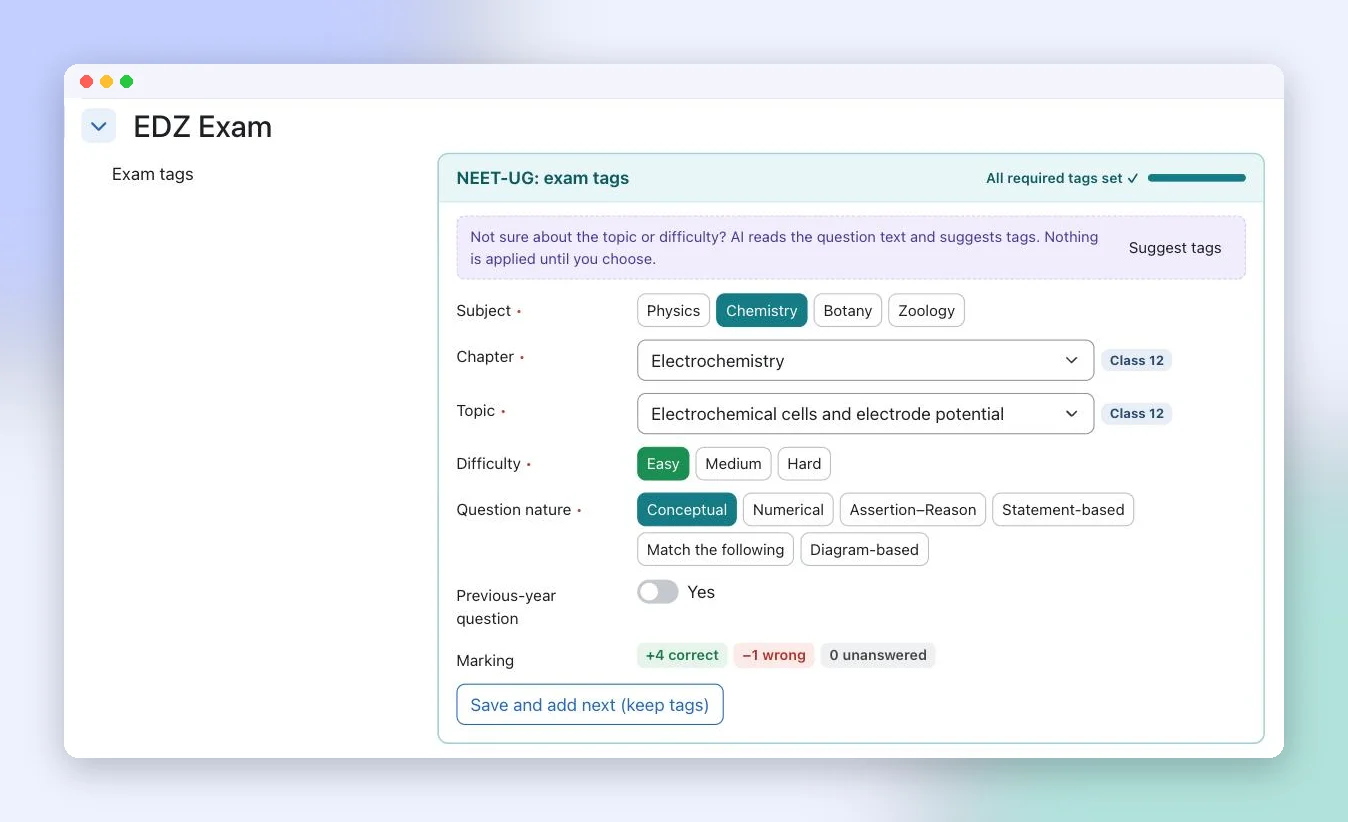
Everything starts with a clean question bank. EDZ Exam adds an Exam tags panel to the normal Moodle question form, so faculty do not learn a new tool. For each question they pick the subject, chapter and topic (each chapter is marked Class 11 or Class 12), the difficulty, the question nature (conceptual, numerical, assertion–reason, statement-based, match the following, diagram-based) and whether it is a previous-year question. The NEET marking of +4, −1 and 0 is shown right there and applied automatically.
Three ways to tag
- In the question form, with a Save and add next (keep tags) button for entering a run of questions from the same chapter.
- From an Excel template whose Subject, Chapter and Topic columns are linked dropdowns. The import checks every row first, and nothing is saved until you confirm. Pictures can be uploaded as a ZIP.
- With AI suggestions. AI reads the question text and suggests tags, and nothing is applied until a teacher chooses.
Blueprints: the NEET pattern in one form
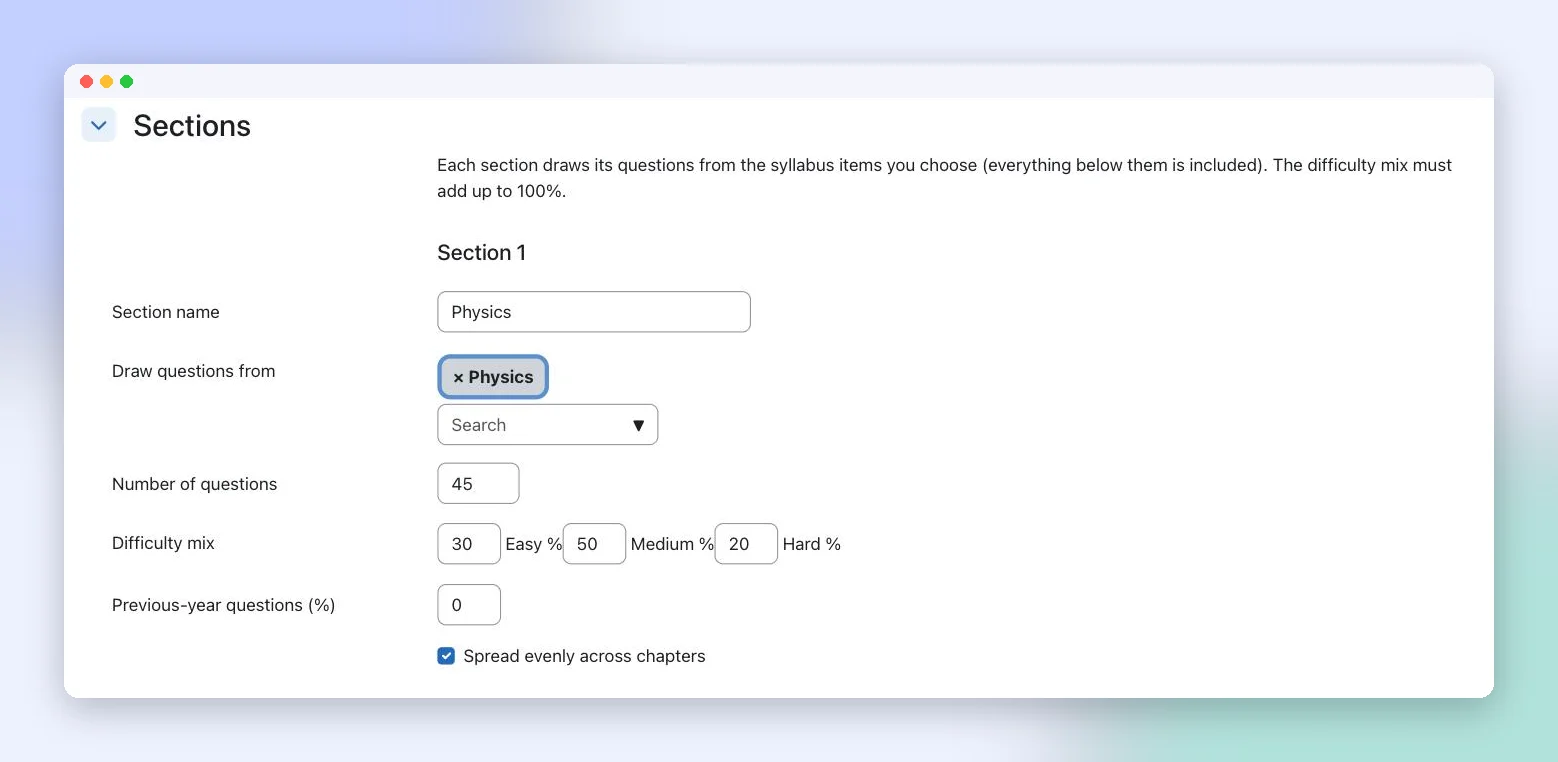
A blueprint is a reusable recipe for a test: its sections, the chapters each section draws from, the number of questions, the easy/medium/hard mix and the share of previous-year questions. It can create the same paper for everyone or a different paper for each student, as a ranked test or a practice set.
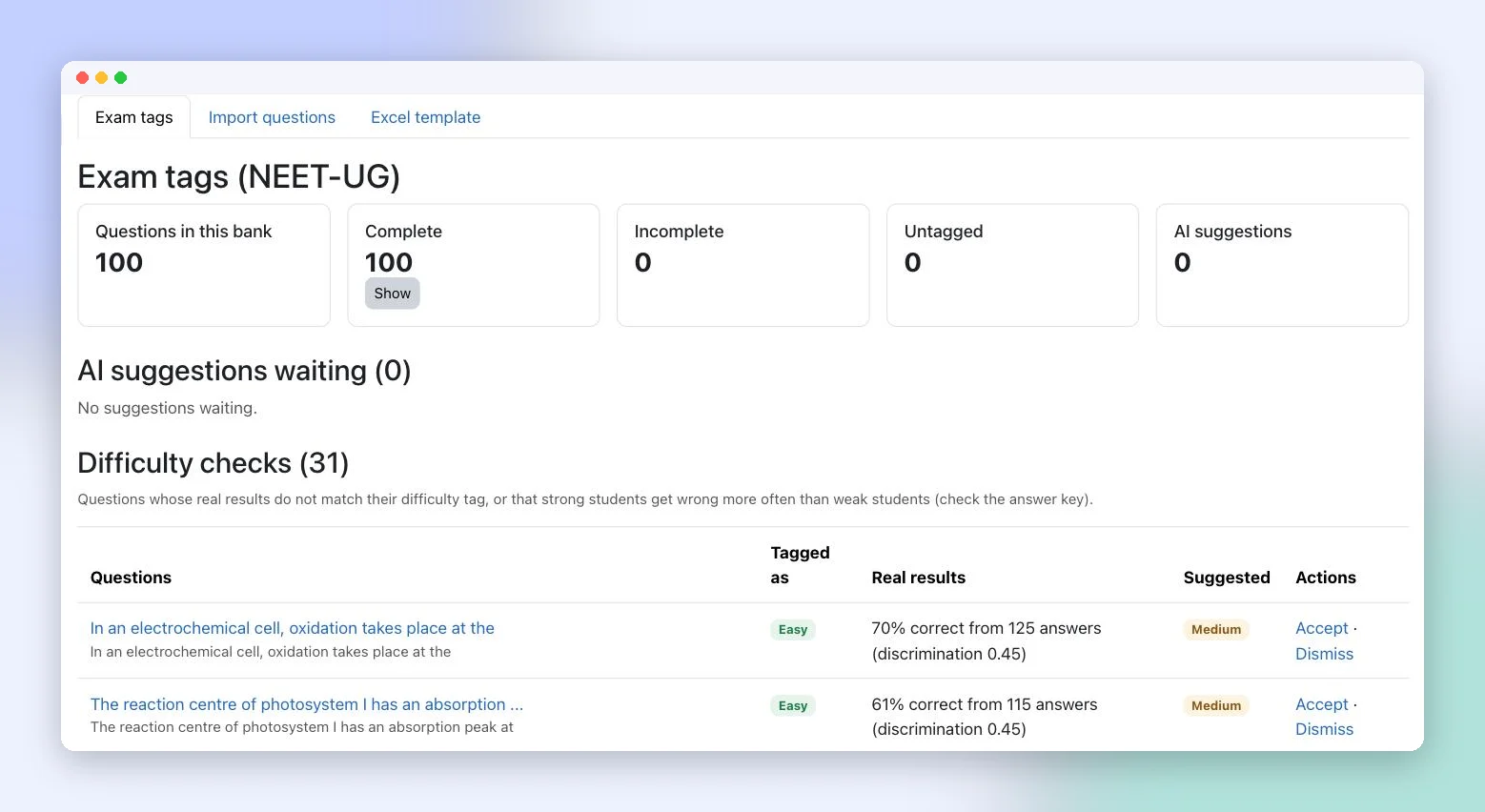
Once students start answering, Exam Bank also runs difficulty checks. It flags questions whose real results do not match their difficulty tag, and questions that strong students get wrong more often than weak students, which usually means the answer key needs a second look.
2. Exam Analytics: every test becomes a personal improvement plan
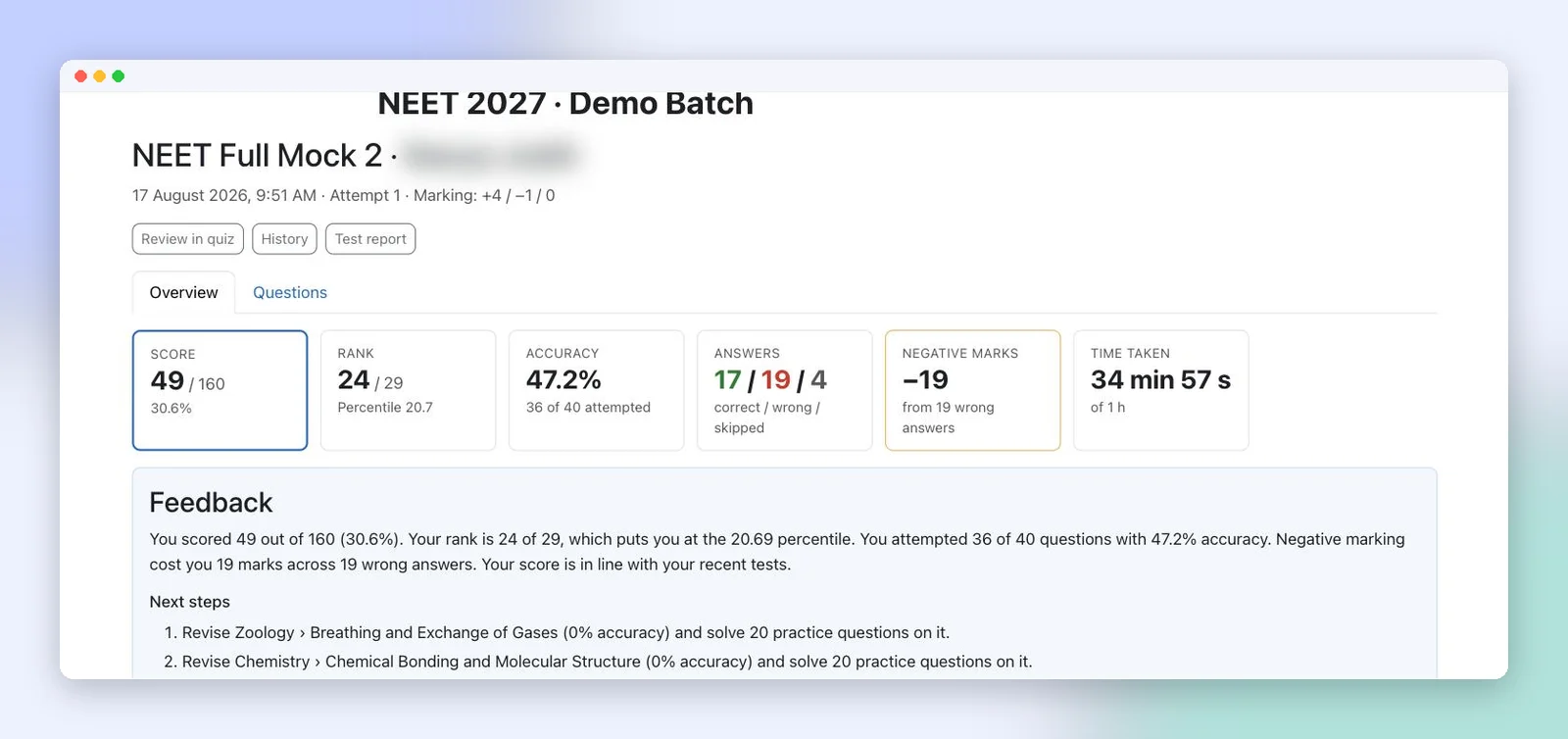
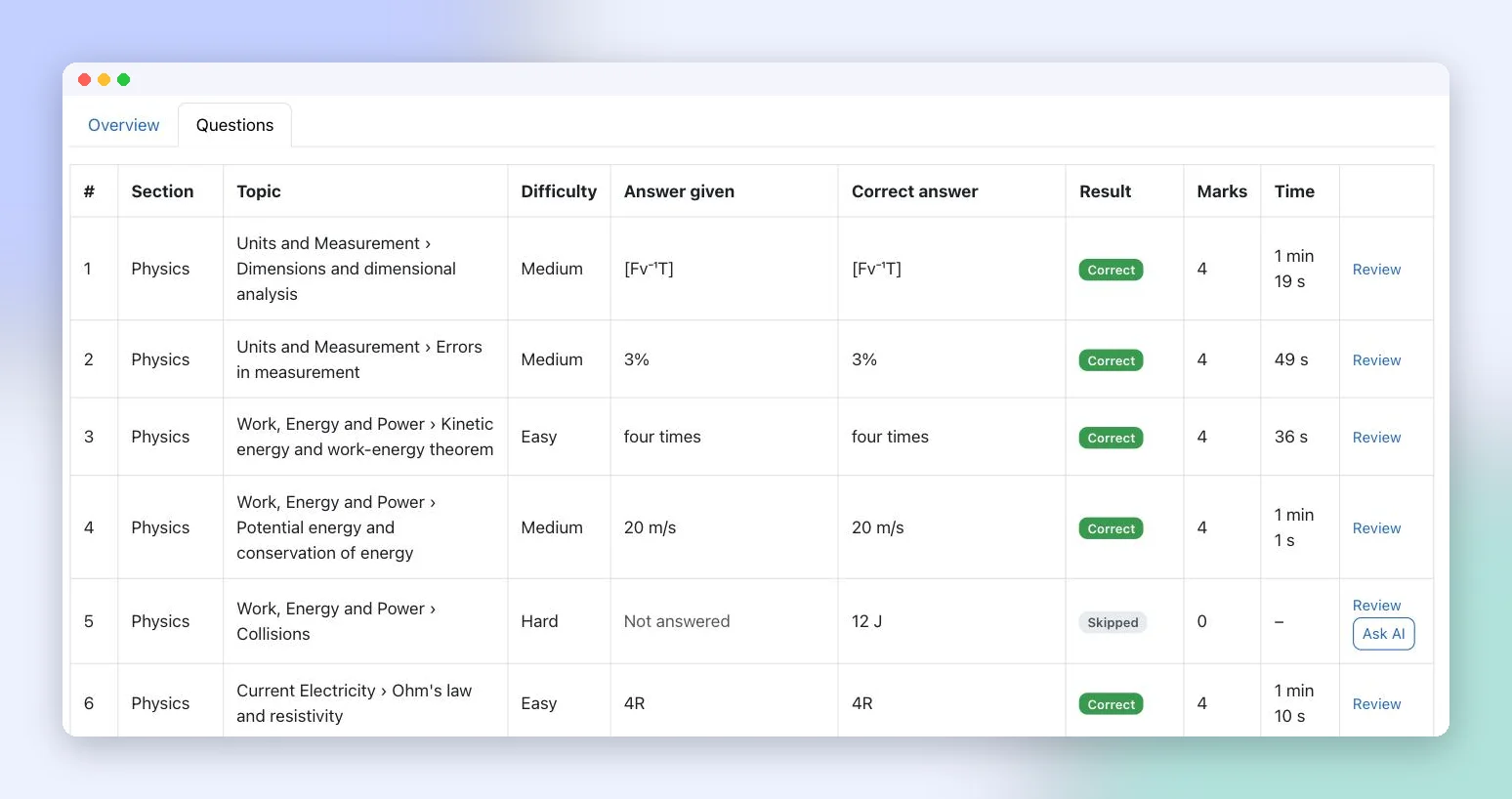
After each test, every student gets a result page instead of just a number: score, rank and percentile, accuracy, correct/wrong/skipped counts, marks lost to negative marking, and time taken. Below that is written feedback with concrete next steps, such as revising a named topic and solving 20 practice questions on it.
"Why did I lose marks?"
This is the part students and parents understand immediately. Using the time spent on each answer, the engine separates lost marks into:
- Likely careless: answered much faster than usual for that question.
- Concept gap: enough time was spent, but the answer was still wrong.
- Wrong with no clear time signal, and skipped.
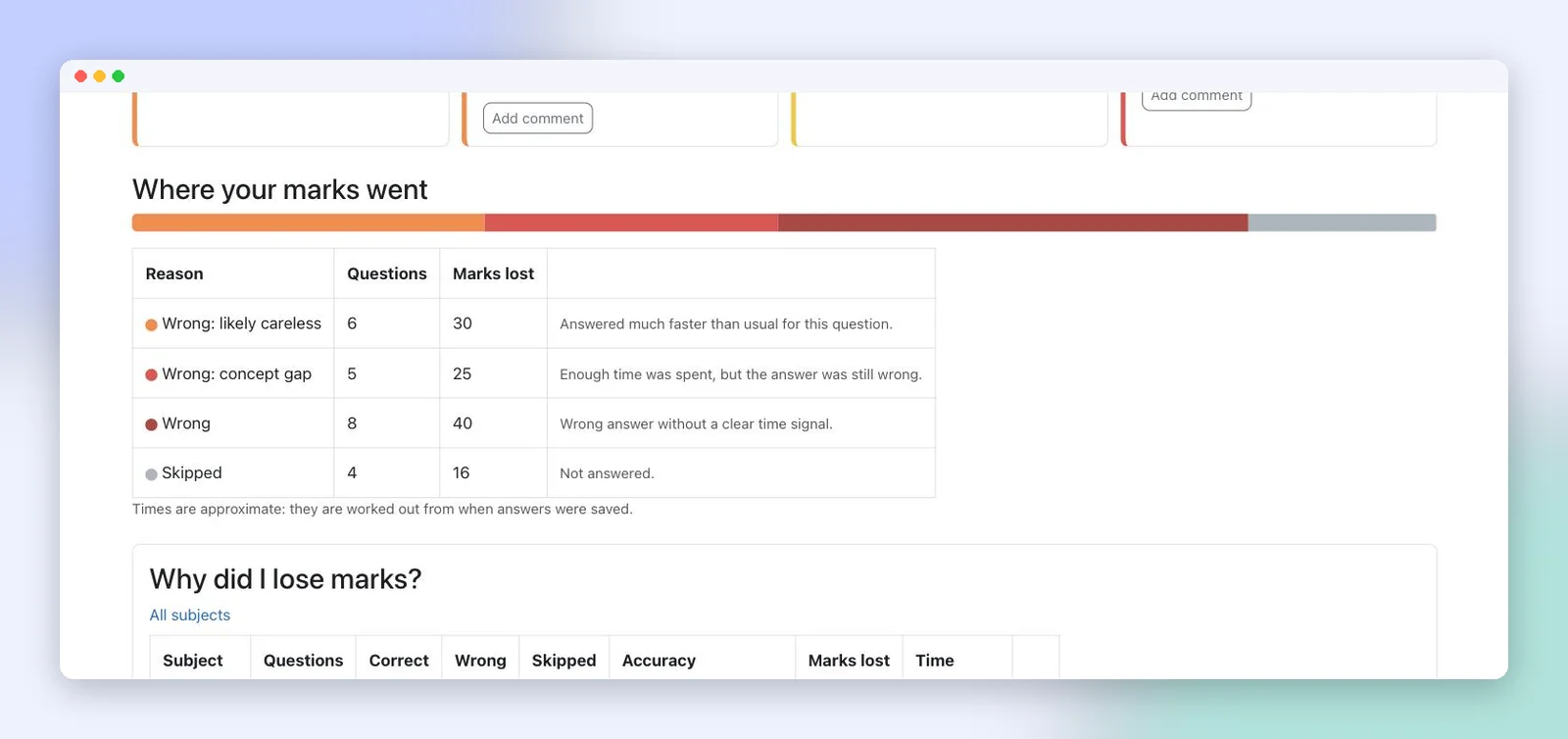
The same view breaks results down by subject and by difficulty, then lists the chapters to focus on next. Each section card carries a short written note, for example that several wrong answers were given very quickly and the student should slow down. Feedback can be written from rules or by AI, and a mentor can review it before students see it.
For teachers: the test report
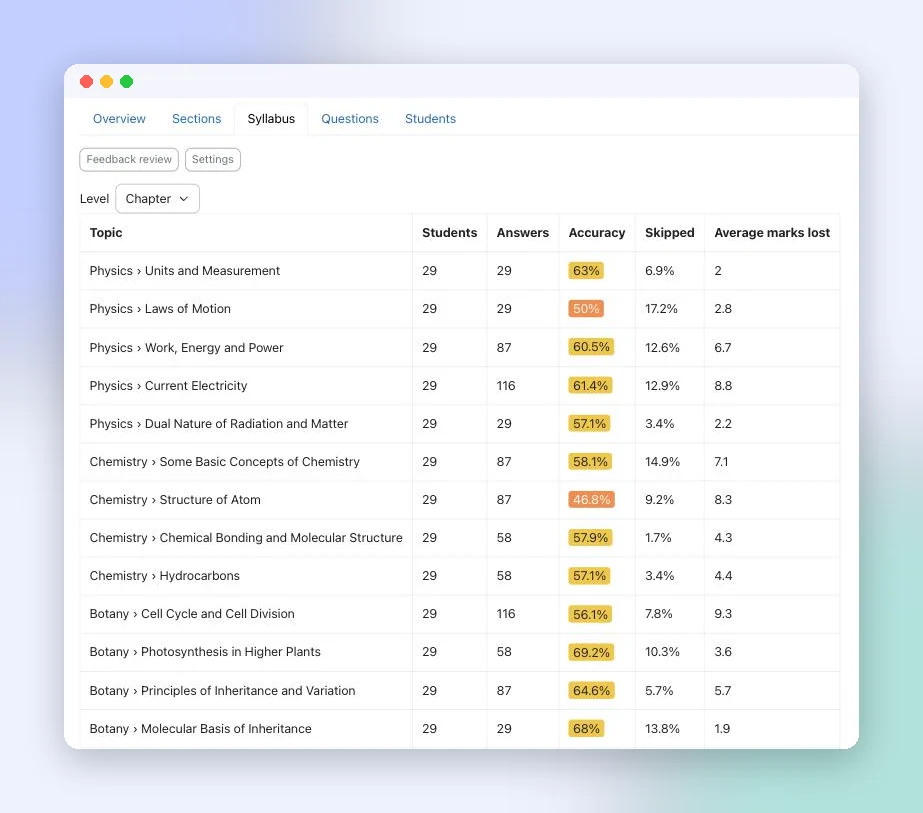
Faculty see the batch view: average, median and highest scores, accuracy, negative marks, a score distribution, accuracy by section and a chapter-by-chapter table showing where the batch struggled.
3. Exam Insights: know who needs help before the next test
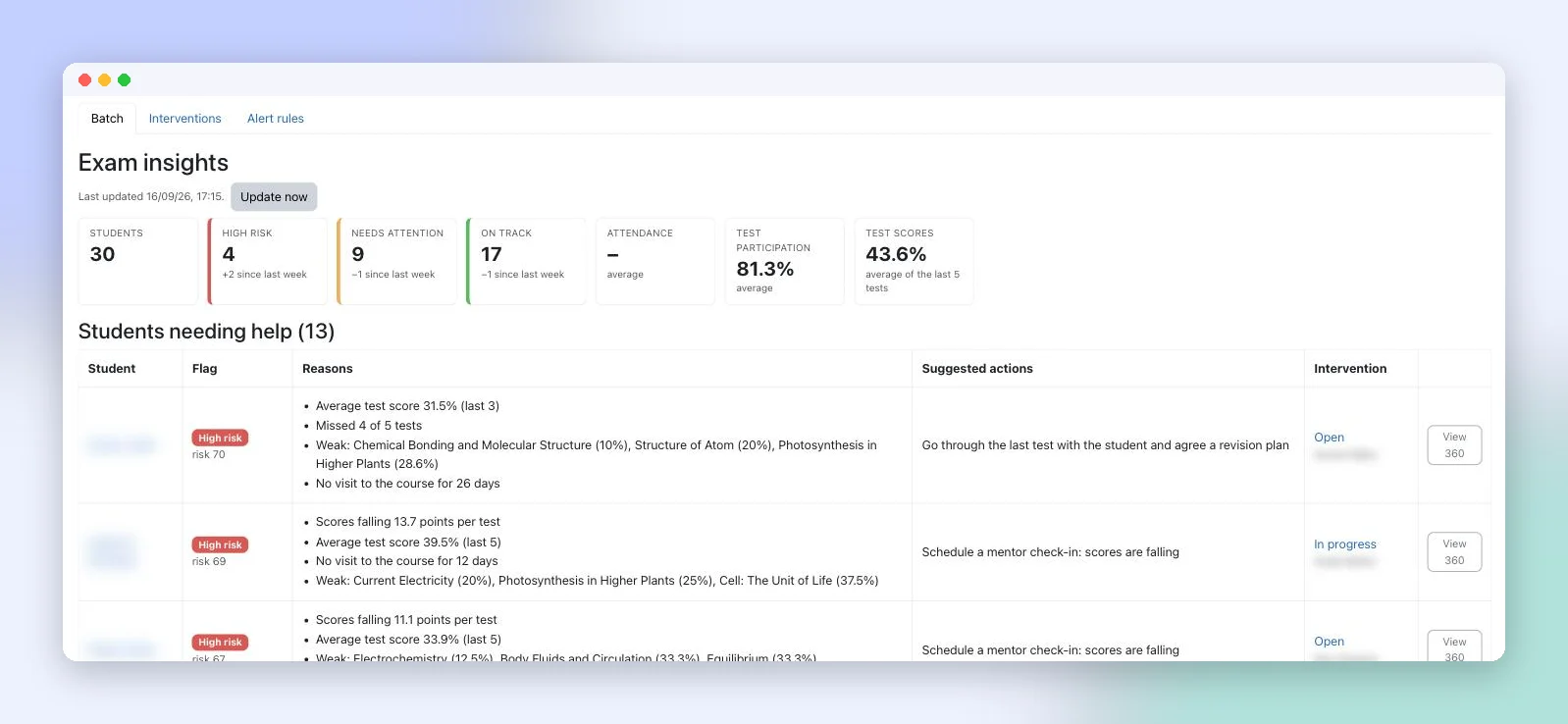
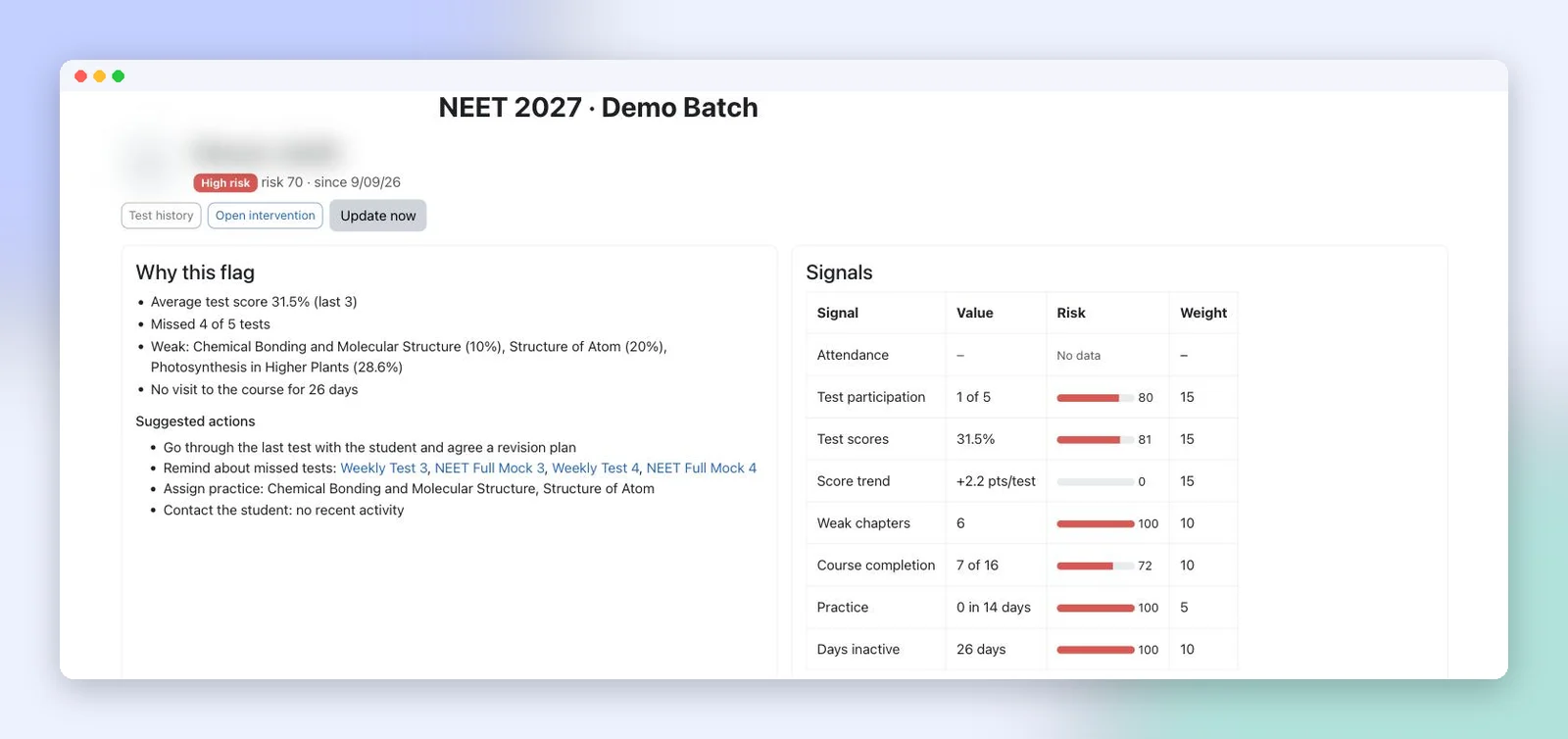
Every day, each student gets a flag: on track, needs attention or high risk. The flag is built from signals an academic team already cares about: attendance, test participation, test scores, score trend, weak chapters, course completion, practice and days inactive. Each signal has a weight the institute can see.
What makes the flag useful is that it explains itself in plain words (for example: missed 4 of 5 tests; weak in Structure of Atom; no visit for 26 days) and suggests the next action, such as reminding the student about missed tests or scheduling a mentor check-in.
Mentors, interventions and alerts
- My mentees gives each mentor their own list, filtered by flag or follow-ups due.
- Student 360 shows the reasons, the signals, test history, weak chapters, missed and upcoming tests, a 60-day risk chart and an optional AI summary for mentors.
- Interventions record who is following up and by when, and they close when the work is done.
- Alert rules notify students, parents, mentors and teachers when a flag changes, a test is missed or a score drops, and each rule shows how many students it would reach today before you switch it on.
4. AI Doubt Solver: doubts answered any time, with teachers in the loop
A student takes a photo of a question from a book or their notes, or types it. AI reads the question, including formulas, and returns a step-by-step answer with the key idea. Follow-up questions continue in the same conversation. The same solver opens from any wrong or skipped question on a test result through an Ask AI button.
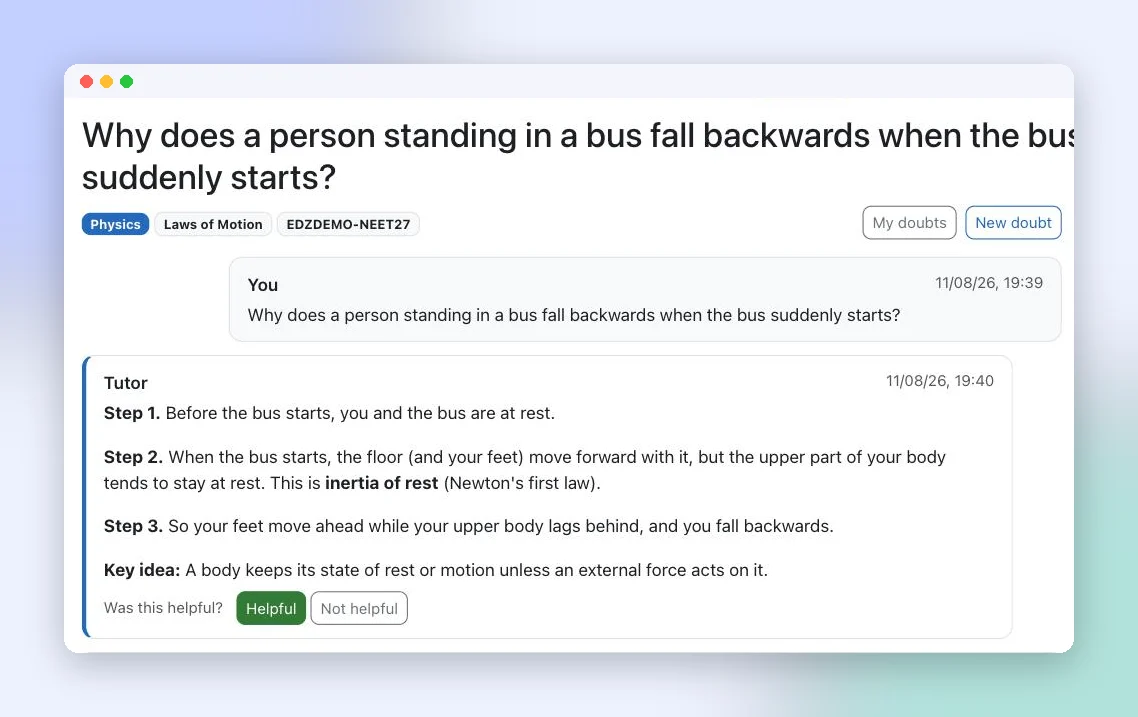
Teachers see the doubts asked in their course and the most-asked topics. Every answer reminds students to check important steps with a teacher, and per-doubt limits and usage reports keep AI cost predictable.
- 1Teacher, Monday
Uploads a new chapter's questions from the Excel template, accepts a few AI tag suggestions and generates Sunday's full mock from the NEET blueprint.
- 2Student, Sunday night
Opens the result, sees that most lost marks in Zoology were careless errors and adds the two weakest chapters to this week's revision.
- 3Student, 11 pm
Taps Ask AI on a wrong Physics answer, gets a step-by-step explanation and asks one follow-up question.
- 4Mentor, Monday
Opens My mentees, sees two new high-risk flags with reasons and logs a check-in with a follow-up date.
- 5Parent
Receives an alert that their child missed a test and a mentor will be in touch.
Not only NEET
Nothing is hardcoded to NEET. Each exam is an exam profile with its own syllabus tree, difficulty levels, marking scheme and extra tags. The same engine can run JEE, CUET or school board preparation, and a school with an integrated coaching programme can run several profiles side by side.
Where AI fits, and where it does not
AI helps with four jobs: suggesting tags, writing result feedback, answering doubts and summarising a student for a mentor. It is optional in every one of them, and the institute stays in control:
- It runs on the institute's own AI key (OpenAI or Google Gemini).
- Student names are removed before any AI summary is written.
- AI tag suggestions are applied only when a teacher accepts them, and feedback can be reviewed by a mentor before publishing.
- Scores, ranks, risk flags and alerts are calculated by rules, not by AI, so they stay the same every time.
EDZ Exam is built on Moodle 5.x and tested on Moodle 5.0 and 5.2. It sits alongside our other Moodle work, such as AI proctoring inside Moodle, the faculty dashboard and attendance tracking for live classes, which feeds the attendance signal.
A test series on its own
- Marks and rank after each test
- Question papers assembled by hand
- Same feedback for every student, if any
- Struggling students noticed after results
- Doubts wait for the next class
An assessment engine (EDZ Exam)
- Section marks, percentile, negative marks and why marks were lost
- Tests generated from a tagged bank and a blueprint
- Written next steps for each attempt
- Daily risk flags with reasons, alerts and mentor follow-ups
- AI doubt solver from a photo, with teacher visibility
About the screenshots
Every screen in this post comes from our demo site with a demo batch of 30 students, 8 weeks, 100 tagged questions and 13 tests. The names and numbers are demo data, not results from any institute, and student names are blurred.
Need something custom-built?
EDZLMS builds and runs Moodle platforms for institutes and enterprises. If your exam pattern, syllabus or reporting needs are different, we can shape the exam profile, blueprints and alerts around them.
Frequently asked questions
Does EDZ Exam work with our existing Moodle?
Yes. EDZ Exam is a set of Moodle plugins built for Moodle 5.x and tested on Moodle 5.0 and 5.2.
Can we upload our own question bank from Excel?
Yes. Download the Excel template, fill in questions with the linked Subject, Chapter and Topic dropdowns, add pictures as a ZIP and upload. Nothing is saved until you confirm.
Is AI required?
No. Tagging, tests, results, risk flags and alerts all work without AI. AI is optional for tag suggestions, written feedback, the doubt solver and mentor summaries.
Which AI does it use, and what happens to student data?
It uses the institute's own OpenAI or Google Gemini key. Student names are removed before any AI summary is written.
Is it only for NEET?
No. Each exam is a profile with its own syllabus, difficulty levels and marking, so the same engine can run JEE, CUET and school board preparation.
Does it support NEET negative marking?
Yes. The NEET profile applies +4 for a correct answer, −1 for a wrong answer and 0 for an unanswered question.
Can parents see their child's progress?
Parents receive alerts today, for example when a test is missed or a risk flag changes. A parent dashboard is coming.
See it with your own batch in mind
If you run a NEET or JEE coaching programme on Moodle, or are planning to, we can walk you through EDZ Exam with a demo batch set up the way your institute works.
Want to see the question bank, results and risk flags on a live demo?
Book a Free Demo →For more information, connect with Mihir Jana on LinkedIn: https://www.linkedin.com/in/mihir-jana-83bb5431/