Course completion shows that a partner's person finished the training. Partner readiness shows they can be trusted with a customer. To certify it, give each partner role its own learning journey, track every required step, and have a named partner lead sign each person off as Delivery Ready, recorded with the date and signer and revocable with a reason.
Key takeaways
- A completion report answers 'did they finish?'. Readiness answers 'would we put them in front of a customer?'. Treat them as different questions.
- Define readiness per role (sales, solution architect, developer, delivery), not one course list for every partner person.
- Separate required steps from optional ones. Only required steps should decide whether someone is ready.
- Make the final call a named, dated sign-off by the partner lead, and keep a history of every sign-off and revoke.
- Give partner leads their own view of their own people only, so they can chase gaps without seeing other partners.
The problem: the report says "complete", the customer says otherwise
If you sell or deliver through partners, you have probably seen this. A reseller's engineer finishes every assigned course. The LMS shows 100%. Two weeks later they run a customer implementation, miss a step your own team would never miss, and the customer escalates to you, not to the partner. The customer sees your product and your brand; the partner's name is a footnote.
Nothing in the training report was wrong. It just answered a different question.
Why course completion is a weak signal
Completion tells you that someone reached the end of the content and met the course's completion rules. It says nothing about whether those courses were the right ones for that person's role, whether the hands-on tasks around the courses were done, or whether anyone who knows the partner's team looked at the result and agreed. For internal staff you fill those gaps with managers and day-to-day observation. For partners you usually can't.
Where partner enablement breaks today
- Spreadsheets as the system of record. Partner rosters, roles, due dates and "who's ready" live in a sheet per partner, updated by hand and out of date by the next review.
- One portal, no walls. Put every partner in one shared portal and they can see each other's people and progress. Lock it down too hard and partner leads see nothing, so they can't manage their own team.
- No owner for the final call. Nobody is accountable for saying "this person is ready". So nobody says it, and readiness gets assumed from completion.
What "delivery ready" should mean
Before you pick a tool, agree on a definition. In our experience running LMS platforms for enterprise training teams, a workable definition of delivery readiness has five parts:
- It is role-specific. A partner's sales lead and their delivery engineer need different evidence. Readiness is defined per track, not per partner.
- It is built from required steps. Courses, checklists (for example "shadowed one live implementation") and reference links. Some are required, some are nice to have. Only the required ones count.
- It has a clear intermediate state. When every required step is done, the person is eligible for sign-off. They are not yet ready.
- It ends with a named human decision. Someone who knows the partner's team signs the person off, and the system records who signed and when.
- It can be undone, with a reason. If a delivery goes wrong or a product changes, the sign-off can be revoked. The reason and the original sign-off stay in the history.
A 5-step framework to certify partner readiness
This framework works whether you have five partners or fifty. It is tool-agnostic; the next section shows how edzlms implements it.
- 1Define tracks for each partner role
List the roles partners put in front of customers, for example Sales/GTM, Solution Architect, Developer and Delivery. Every partner person gets exactly one track, set by you, not chosen by them.
- 2Build a journey per partner and track
Turn each track into an ordered journey, such as 'Partner A – Technical'. Mix courses, checklists and links. Mark each step required or optional and give it a due day counted from the person's start date.
- 3Track every required step automatically
Assign journeys by team and track so new partner people are picked up without manual work. Course steps should complete themselves when the course is completed; checklist steps are confirmed by the learner.
- 4Make sign-off a named, recorded decision
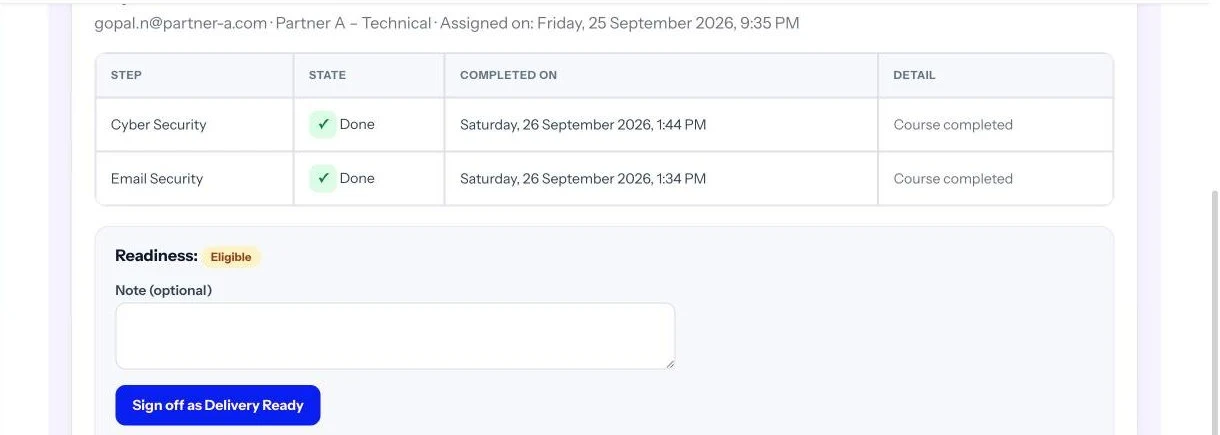
When all required steps are done the person becomes Eligible. The partner lead reviews and signs them off as Delivery Ready. Record the signer and date, allow revoking with a reason, and keep the history.
- 5Chase gaps with targeted reminders
Reminders should list each person's own outstanding steps, overdue first, not a generic 'please complete your training'. Cap them, for example at one per person per day, so they stay useful.
Two decisions that make or break the framework
Who signs off. The vendor's channel team often wants to own sign-off, but they rarely know a partner's individual engineers. The partner lead does. Give the partner lead the sign-off, keep an admin override, and make both visible in the history.
What partner leads can see. A partner lead needs to see their own people, progress, readiness and reports, and act on them without raising a ticket. They must never see another partner's people or your internal teams. If your platform can't enforce that separation, partner leads end up with nothing, and the spreadsheets come back.
Course completion
- Answers: did they finish the assigned content?
- Same course list for everyone
- Recorded automatically, no one is accountable
- Stays 'complete' even when things change
- Usually visible only to the vendor
Delivery readiness
- Answers: would we put them in front of a customer?
- Journey per partner and role, with required and optional steps
- A named partner lead signs off, with date
- Can be revoked with a reason, history kept
- Partner lead sees and manages their own people
How edzlms does it
edzlms runs this framework inside your own LMS, so there is no separate partner portal to buy or integrate. It is built with our EdzTeams and EdzOnboard modules and also runs on an existing Moodle. An admin turns on partner mode, creates one team per partner with a partner lead, and imports partner people by CSV with their track. Journeys are built per partner and track, and new team members are assigned automatically.
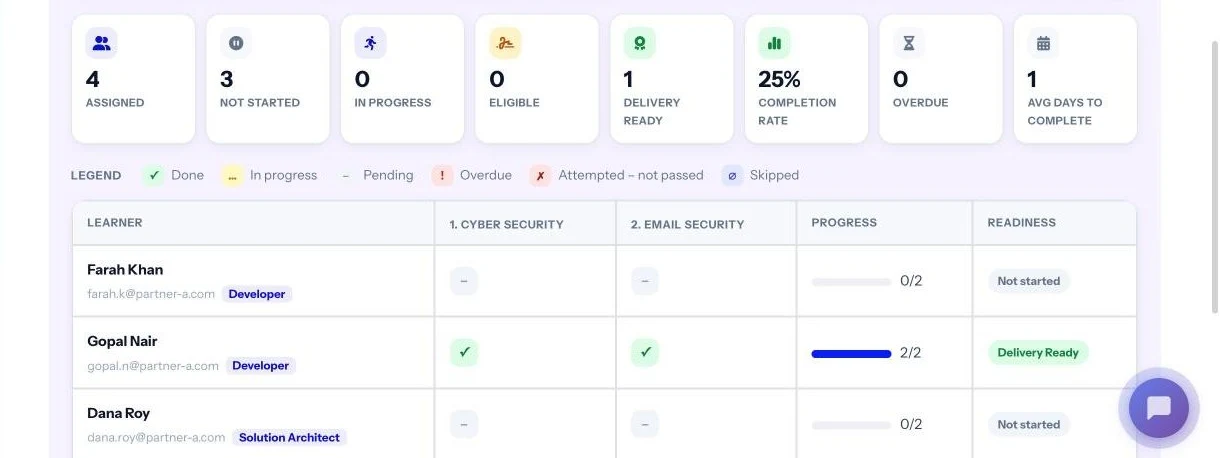
Learners get a welcome pop-up and a My Onboarding page with their progress, next step and due dates. When every required step is done they become Eligible, and the partner lead signs them off. The partner lead or an admin can revoke a sign-off later, with a reason.
Partner leads only ever see their own partner's people. They get a report per journey, a consolidated report with CSV, Excel and PDF export, and reminders that show each person their own outstanding steps. See the Partner Enablement & Delivery Readiness page for the full walkthrough.
Partner readiness checklist
Use this before you onboard your next partner, whatever platform you use.
- ☐ Roles (tracks) are defined, and each partner person has exactly one
- ☐ Each track has a journey with required and optional steps marked
- ☐ Every required step has a due day counted from the start date
- ☐ Course steps complete automatically; checklist steps have a clear "done" definition
- ☐ New partner people are assigned without manual work
- ☐ "Eligible" and "Delivery Ready" are separate states
- ☐ A named partner lead owns sign-off, with an admin override
- ☐ Every sign-off records signer and date; revokes need a reason
- ☐ Partner leads see only their own partner's people
- ☐ Reminders list each person's own overdue steps and are rate-limited
- ☐ Reports export for the partner's own reviews
Running partner training for distributors or dealers as well as system integrators? Our guide to one LMS for employees and distributors covers the wider extended-enterprise setup, and LMS reporting and tracking covers what to measure.
Start with one partner and one track
Pilot the framework with your most active partner and their delivery track. You will find out quickly which checklist steps are unclear and who should really own sign-off, before you roll it out to every partner.
Frequently asked questions
What is partner readiness?
Partner readiness is evidence that a specific person at a channel partner can represent or deliver your product to a customer. It goes beyond course completion: it is defined per role, built from required steps, and confirmed by a named sign-off.
How is partner readiness different from partner certification?
Certification usually means passing an exam or course. Readiness uses that as one input, then adds role-specific steps such as checklists, and a recorded decision by someone accountable for the partner's team.
Who should sign off a partner person as delivery-ready?
The partner lead, because they know the individual. Keep an admin override for the vendor's channel team, record who signed and when, and let either of them revoke a sign-off with a reason.
Can partners see each other's training data?
They shouldn't. A partner lead should see only their own partner's people, journeys and reports, never another partner's or the vendor's internal teams.
Do we need a separate PRM or partner portal to do this?
Not necessarily. edzlms delivers partner journeys, tracking and Delivery Ready sign-off inside your LMS, including an existing Moodle, without a separate PRM platform.
See partner readiness in action
We'll show you a partner journey end to end: import, journeys by track, the learner view, the partner lead's report and a Delivery Ready sign-off in the LMS.
For more information, connect with Mihir Jana on LinkedIn: linkedin.com/in/mihir-jana-83bb5431